
Track Voting Participation in Real Time
Last updated August 25, 2026
The Daily Participation report shows how many members have voted while your election is open, so you can track turnout in real time without waiting for final results.
View Transcript
[0:01]: Welcome to Ballot Bites. Today's topic is the Daily Report. There are two ways to view the daily report. First, after your election has closed, you can see results right on your dashboard under Summary & Reports.
[0:13]: Second, from the Reports section in the left navigation menu, navigate to Daily Participation. These results will update in real time during the voting period, so you can check progress anytime after your election opens.
[0:30]: The chart shows the number of daily ballot submissions by date. The summary statistics will include total submissions, the peak day—which is the day with the most voters—the daily average, and days with no submissions.
[0:51]: It's that easy to see your members' participation in your election. Thanks for watching; grab another bite in our series of quick tips at any time.
Access the Daily Participation report
There are two ways to view the report:
- During the voting period: go to the Reports section in the left navigation menu and select Daily Participation.
- After the election closes: check your dashboard under Summary and Reports.
Real-time updates

- The Daily Participation report updates in real time during the voting period.
- You can monitor progress anytime after your election opens.
Understand the chart and statistics
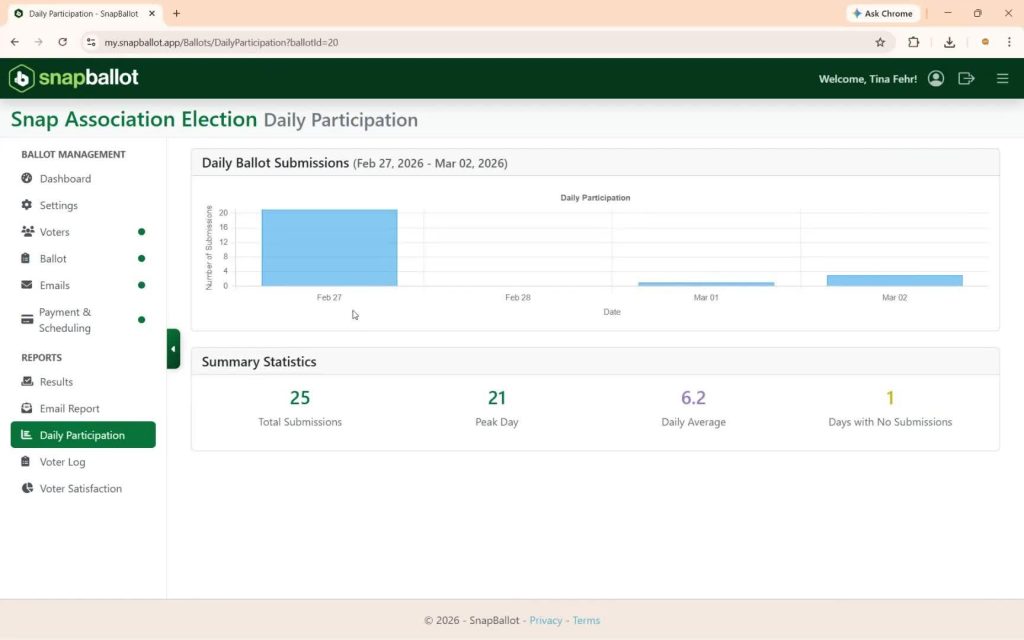
The chart displays the number of daily ballot submissions by date. Summary statistics include:
- Total Submissions — the overall number of votes cast.
- Peak Day — the day with the highest number of voters.
- Daily Average — the average number of submissions per day.
- Days with No Submissions — days when no votes were cast.
Related articles
Building Your Ballot
How to build your ballot — creating ballot items, adding candidates and biographies, setting voting rules and rotation, filtering by…

How to View & Export Final Election Results
How to access, view, and export your election's final results — the report types available, real-time updates, and downloading to…
SnapBallot Overview
A step-by-step overview of setting up an election in SnapBallot — from creating a ballot and uploading voters to configuring…
From The Blog

5 Ways to Increase Homeowner Engagement in Your HOA Community
Learn 5 practical strategies to boost homeowner engagement, increase HOA election participation, reach quorum, and build a stronger community.
Checklist: Preparing for Your Next HOA Election
Planning will help you run a successful, problem-free HOA election. Follow this checklist to confidently plan every stage of the…
Common Questions About Electronic Voting Systems for HOAs
Get answers to the most common questions about HOA electronic voting systems, including legality, security, compliance, accessibility, and homeowner adoption.